How VIA works.
Downloadable software, delivered as an OVA appliance you import and run yourself. Five steps. Five deliverables.
From Precheck to report.
Everything is agentless (L1, L2, and L3) and driven from the WebUI. An L1 scan already gives an actionable infrastructure report; the optional (recommended) L2/L3 passes enrich the sections that depend on guest systems (applications, dependencies, connections).
vCenter connection and Precheck
Read-only vCenter: permissions, topology, readiness summary. License activated here if required.
Full inventory via vCenter
Full inventory via the vCenter API, no guest credentials. This already produces an actionable infrastructure report.
Credentials and test
Guest credentials and scan depth, tested on a sample of VMs (VM picker) before the real run.
Intra-VM analysis
In-guest read via VMware Tools: installed packages, OS, network config (L2), running services and active TCP connections (L3). No agent, no config change.
Report generation
All deliverables, generated at once and offline. Details below.
What each depth collects, and the rights required.
| Depth | What it collects | Rights required | Guest access |
|---|---|---|---|
| L1 | vCenter inventory: VMs, hosts, datastores, vSphere network | Read-only vCenter account | No data read inside the guest (see the caveat below the table) |
| L2 | Adds installed packages and software, processes, scheduled tasks, config, Linux connections | Standard local user | Guest Operations API, no execution; optional out-of-band fallback (off by default): direct connection to the VM over SSH or WinRM over HTTPS, with a shorter, fixed set of read-only commands |
| L3 | Adds connections with process names, running services, Windows local accounts and groups, license and domain, drivers, volumes | Administrator (Windows) or root (Linux) recommended | Runs read-only commands |
Whatever the depth: no persistent agent, no configuration change, through the vCenter and Guest Operations API, no port opened to the guest. L1 and L2 are read-only; L3 runs read-only commands and writes output files (one per command) in the guest's temporary directory, whose size depends on the VM, left in place. Optional out-of-band fallback (off by default, L2 or L3 depth) over SSH or WinRM over HTTPS, with a shorter, fixed set of read-only commands. L1 caveat: if the service account holds the Guest Operations privileges, the Precheck and the connection test attempt a guest login with a fictitious account on a powered-on VM from the inventory, which leaves authentication failures in that VM's logs; with the Read-Only role alone, vCenter refuses the attempt before it reaches the guest.
OVA appliance. Embedded WebUI.
VIA is delivered as a pre-configured OVA appliance. Import it into your VMware environment, configure your license and vCenter settings, and you're ready.
The embedded WebUI is clean and guided: it walks you through each step, shows a live log during the Precheck and the scan, and lets you test guest credentials on a sample of VMs before the full scan.
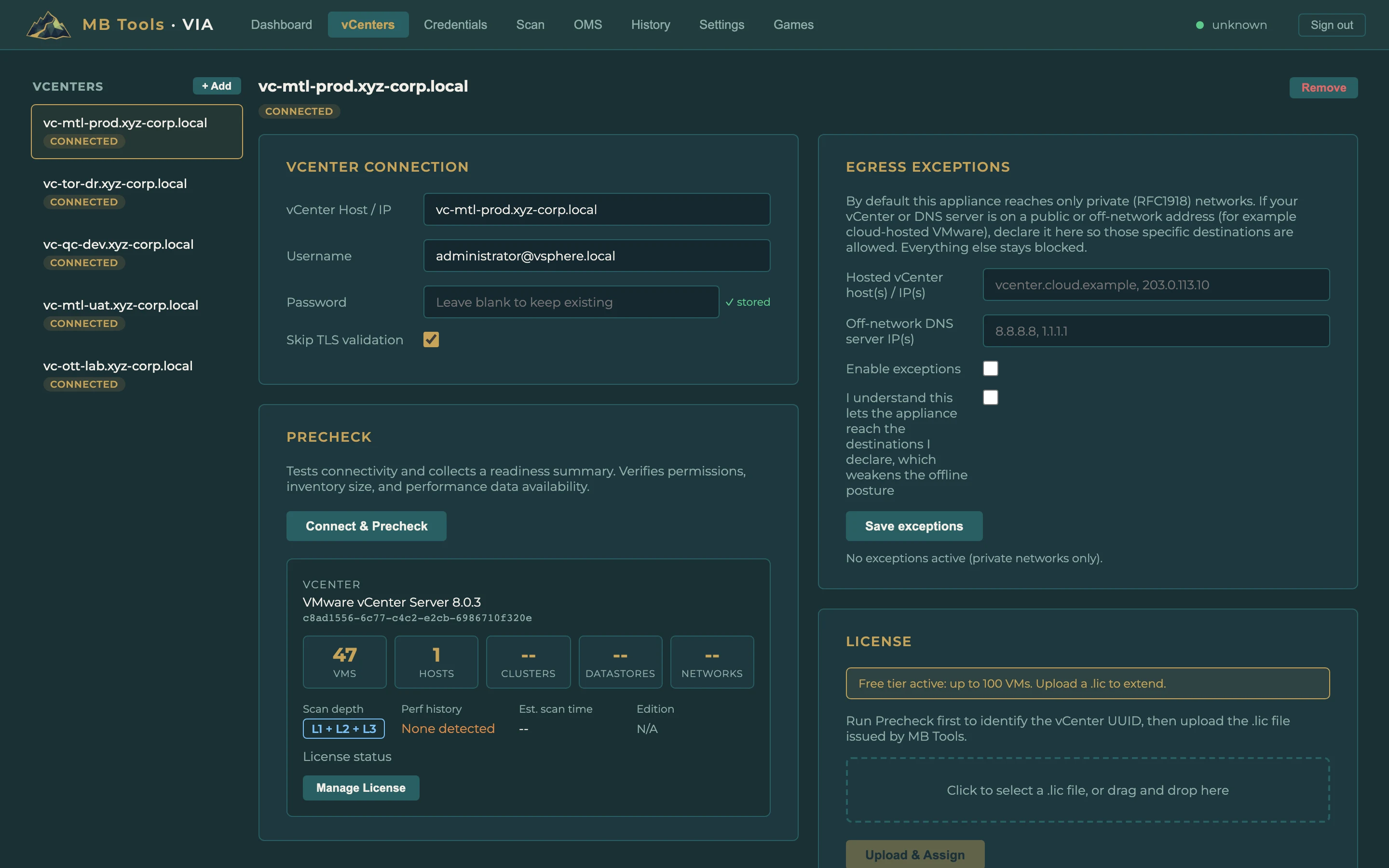
Screenshots from a synthetic demonstration environment.
- vSphere
- 6.7 through 9.0 (vCenter and at least one ESXi host); works with Enhanced Linked Mode (verified on 9.0, one scan per vCenter)
- Deployment
- Self-managed (on-prem) and cloud-managed / hosted VMware, subject to available access
- Appliance host
- ESXi 6.7 Update 2 or later (virtual hardware 15)
- Resources
- 2 vCPU and 4 GB RAM (minimum) for the appliance
- Footprint
- About 25 GB thin-provisioned
- vCenter account
- Built-in Read-Only role (L1); L2/L3: + GuestOperations.Query / Execute
- Network
- 443 (appliance to vCenter, and to ESXi hosts for L2/L3), 8443 (you to the appliance), 53 (DNS, when vCenter or the ESXi hosts are addressed by name); if the out-of-band fallback is enabled (L2 or L3, off by default): 22 (SSH) or 5986 (WinRM over HTTPS) to the targeted VMs
- Guest systems
- Windows and Linux for in-guest analysis (L2/L3); coverage varies by OS and version, detailed matrix in the portal
No persistent agent. No configuration changes.
No persistent agent
Nothing is permanently installed on the VMs being analyzed. VIA uses the vCenter API (L1) and VMware Guest Operations via VMware Tools (L2 and L3), or, as an optional fallback off by default, a direct connection over SSH or WinRM over HTTPS.
No configuration changes
VIA changes no configuration: the vCenter service account is built on the Read-Only role, with no write privilege on the vCenter inventory; L2 adds VirtualMachine.GuestOperations.Query and L3 VirtualMachine.GuestOperations.Execute, used only for reads (L3 runs only fixed, hardcoded read-only commands). The L2 guest scan queries APIs without running commands; the optional out-of-band fallback (off by default, L2 or L3) runs a fixed set of read-only commands over SSH or WinRM over HTTPS; L3 also writes output files (one per command) in the guest's temporary directory, whose size depends on the VM, left in place (details in the portal Trust Center).
Transient, schedulable load
The L1 scan issues read-only vCenter API calls only, with negligible load. The L2 and L3 guest passes read from inside the VM via VMware Tools (or, when enabled, the out-of-band fallback): they add a brief, limited load. Schedule and validate collection for the size and constraints of your environment.
Five deliverables.
A full dynamic report and a vector SVG architecture diagram, plus the Excel workbook, the PDF summary, and the raw exports. One format per audience, the same findings for everyone. All in a single run, anonymized option available.
Screenshots from a synthetic demonstration environment.
Inside your network, and only there.
VIA runs entirely inside your network: agentless, with a Read-Only role in vCenter; at L2 and L3, guest operations limited to reads, with no telemetry or automatic upload. No data from your environment is sent outside automatically (only what you choose to share reaches us), and an anonymized version is produced by default (stable aliases, with the mapping table kept on your side). The report is produced and kept on the appliance, inside your network, and you download it.